
Important Takeaways:
- AI writing tools simplify content creation. They turn short prompts into complete drafts for blogs, ads, or emails in seconds. What you get depends on how clear your prompt is. The better your input, the more accurate and useful the output becomes.
- AI doesn’t think or feel. It writes based on patterns learned from text, not real experience. That means it can create readable content, but it still needs human review for facts, tone, and creativity.
- The most effective use of AI comes from combining its capabilities with your own writing skills. Learning how to write effective prompts and understanding how AI works gives you a competitive advantage. An article about Best AI Writing Tools can be a good place to start exploring and using AI effectively in your writing process.
Writing content by hand, using pen and paper, is what we are all accustomed to in school. But today, things have changed quite a bit. With just a click of a button, you can start writing a whole piece of content with the help of AI writing tools.
AI can now write blog posts, ads, and emails faster than humans.
AI writing tools have revolutionized the creation of content. What started as grammar checkers and text suggestions has grown into full-scale writing assistants.
This article walks you through important things that you need to know about what an AI Writing tool is, including how it works and how to make use of it. By the end, you will have a clear understanding of how to apply it in your day-to-day life.
What is an AI writing tool?
An AI writing tool is software that uses artificial intelligence to create or improve text based on your instructions. You type a prompt or short command, and the tool generates words, sentences, or full paragraphs that match what you ask for.
People use AI writing tools for many tasks, such as:
- Writing blog articles and web content
- Creating social media captions and ad copy
- Drafting product descriptions or marketing emails
- Editing grammar, tone, and clarity
- Summarizing long reports or documents
These tools work through large language models (LLMs)—advanced systems trained on massive amounts of text from books, websites, and real conversations. Through this training, they learn language patterns and how words connect within a specific context.
When you give a prompt, the AI doesn’t think or feel. It doesn’t have opinions or emotions. It predicts the next most likely word based on the data it has learned. The result is writing that looks natural and human-like, even though it’s powered by algorithms and pattern recognition.
How does an AI writing tool work?
AI writing tools work by analyzing the provided instruction, commonly known as a prompt, and pulling information from their knowledge base, which has been trained to generate a response. To make it simpler, here are the exact three short processes of how an AI writing tool works:
- Input. You start with a prompt or topic. It can be as short as “Write a headline about digital marketing” or as detailed as “Write a 500-word blog post about how small businesses use AI for social media.” The clearer your prompt, the better the result.
- Processing. Once you submit the prompt, the tool activates its language model. The model has learned language patterns from billions of sentences across various sources, including books, websites, and conversations. It doesn’t copy text, but it predicts the words that logically follow. It evaluates tone, topic, and sentence flow to produce natural, readable text.
- Output. After processing, the tool presents a draft you can review, edit, and refine. You can ask it to make the text shorter, longer, or more specific.
Example:
Prompt: “Write a paragraph about healthy eating.”
Output:

From the example given, the prompt “Write a paragraph about healthy eating” tells the AI what to write about. The tool looks at what it has learned about the topic from its training data. It identifies common ideas such as eating fruits, vegetables, and avoiding sugar. Then it puts those ideas together into clear sentences.
That’s why the output sounds natural and explains healthy eating in a simple, helpful way.
What makes an AI writing tool useful
AI writing tools are useful because they remove many small steps that slow writers down. With AI, you can begin with a ready draft that you can edit and improve.
Also, an AI writing tool is useful in so many ways, such as the following:
- It saves you time. AI writing tools can create outlines, ideas, or full drafts in seconds.
- It improves the quality of your writing. AI writing tools can suggest using more effective words, correcting grammar, and adjusting tone.
- It breaks writer’s block. AI writing tools can give you a starting point when you’re stuck.
- It supports search engine optimization (SEO). Some AI writing tools, such as Jasper.ai, recommend keywords and structure content to enhance search engine rankings.
- It helps you stay consistent: AI writing tools can assist you in maintaining a consistent tone and style across all your content.
Example:
You input: “Write a product description for a fitness app.”
The output:
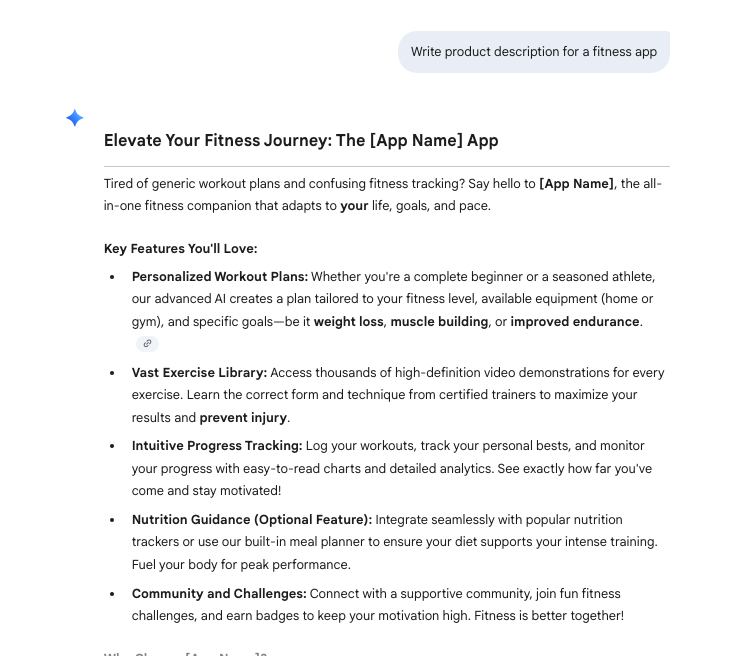
This demonstrates how the AI transforms your basic idea into clear, engaging text that aligns with your goal. It’s fast, simple, and helps you focus on fine-tuning instead of starting from scratch.
What are the limits of using AI writing tools?
While there are many advantages when using AI, it also comes with some limitations. Primarily, it depends on how you use it.
Here are the limitations:
- They can sound generic. When you tell AI a basic prompt, it generates text based on patterns, not real experience. As a result, the writing can feel bland or repetitive. It often lacks emotion, storytelling, and personality. The prompt or instruction you provide really matters. The more detailed and informative your prompt, the more information the AI processes and the better the results it produces
- They can include false or outdated information. AI doesn’t always know what’s true. Some tools use outdated data or make assumptions based on patterns. Without checking, you might publish content that’s inaccurate or misleading. That’s why you should always verify numbers, names, and sources before publishing.
- They can reflect bias. Because AI learns from online data, it can repeat the same biases found in that data. This can lead to stereotypes or unfair statements if not reviewed carefully.
- They lack original thought. AI doesn’t think, reason, or understand context like a human. It can’t generate true insights, opinions, or creative ideas. It predicts text, but it doesn’t form ideas from real experience.
- They still need human review. Every AI-generated draft should be reviewed for tone, accuracy, and flow. Your job as a writer is to shape the message, add personality, and ensure it resonates with your audience.
How to use AI writing tools wisely?
AI writing tools work best when you guide them with clarity and judgment. They’re powerful, but your input or prompts decide how good the final result becomes. Here are some best practices on how to make the most out of AI writing tools:
- Write clear, specific prompts. Be direct about what you want. Include the topic, purpose, tone, and target reader. A detailed prompt provides the AI with sufficient context to generate useful text.
- Review every output before publishing. Never post AI text without checking it. Look for wrong facts, unclear sentences, or missing details. Edit until it sounds accurate and natural.
- Use plain, human-sounding language. Keep your writing simple and conversational. Avoid technical words or complex phrases unless they add value. Clear writing connects more effectively with readers and ranks higher in search results.
- Combine AI drafts with your expertise. Use the tool as a structure and source of ideas, but add your own insights and experiences. Readers trust human judgment, not machine predictions.
- Follow ethical use. Be transparent when AI helps you write. Disclose AI-assisted content where needed and always respect privacy, copyright, and originality.
Final thoughts
AI writing tools have changed how people create content. They make writing faster, help with ideas, and improve structure. But their real value comes when you use them as a partner, not a replacement.
If you’ve learned how these tools work, your next step is to put them to use. Start by testing one or two trusted platforms and see how they fit your workflow. Pay attention to how your prompts shape the results and how editing makes the text sound more human. That’s how you build real skill with AI-assisted writing.
To help you choose the right tool, read our guide on the best AI writing tools. It compares features, pricing, and strengths, so you can choose the right one for your needs.